> ## Documentation Index
> Fetch the complete documentation index at: https://docs.symmetry.com/llms.txt
> Use this file to discover all available pages before exploring further.
# Audit trail
> What the Symmetry I-9 audit trail captures for Forms I-9 and E-Verify cases, and where administrators view it in the employer embedded mode.
Audit events (`auditLogs`) provide a detailed chronological record of key actions taken by the employee and the employer. They are automatically recorded for both Form I-9 submissions and E-Verify cases, providing a reliable, time-stamped trail of key actions and status changes.
This page covers what the trail captures and where administrators find it in the embedded experience. To retrieve the trail programmatically or look up a specific event name, see [Audit Log Reference](/i9/compliance-and-audit-readiness/audit-logs).
## Audit event types
### I-9 events
The I-9 audit events log captures key moments in the form’s lifecycle, such as:
* When the employee submits section 1
* When an authorized representative or employer completes Section 2
* When employees or authorized representatives share their location during the Remote I-9 workflow for Section 2
* IP addresses for each event
* Timestamps for every action
For the complete list of event names and the actor behind each, see the [audit event reference](/i9/compliance-and-audit-readiness/audit-logs#audit-events).
### E-Verify events
In addition to activities related to completing the Form I-9, Symmetry also captures E-Verify events including:
* Status changes (e.g., from “Submitted” to “Pending Response”)
* Actions taken by administrators
* System-generated updates
* Corresponding timestamps
Each entry provides visibility into the E-Verify case lifecycle, helping administrators monitor activity and ensure that all required steps have been taken in a timely manner. E-Verify case events are returned on the case itself rather than on the I-9 submission—see [Manage E-Verify Cases via API](/i9/e-verify/manage-cases-api#everifycase-object).
## Accessing the audit trail
### Employer embedded mode
#### Form I-9 events
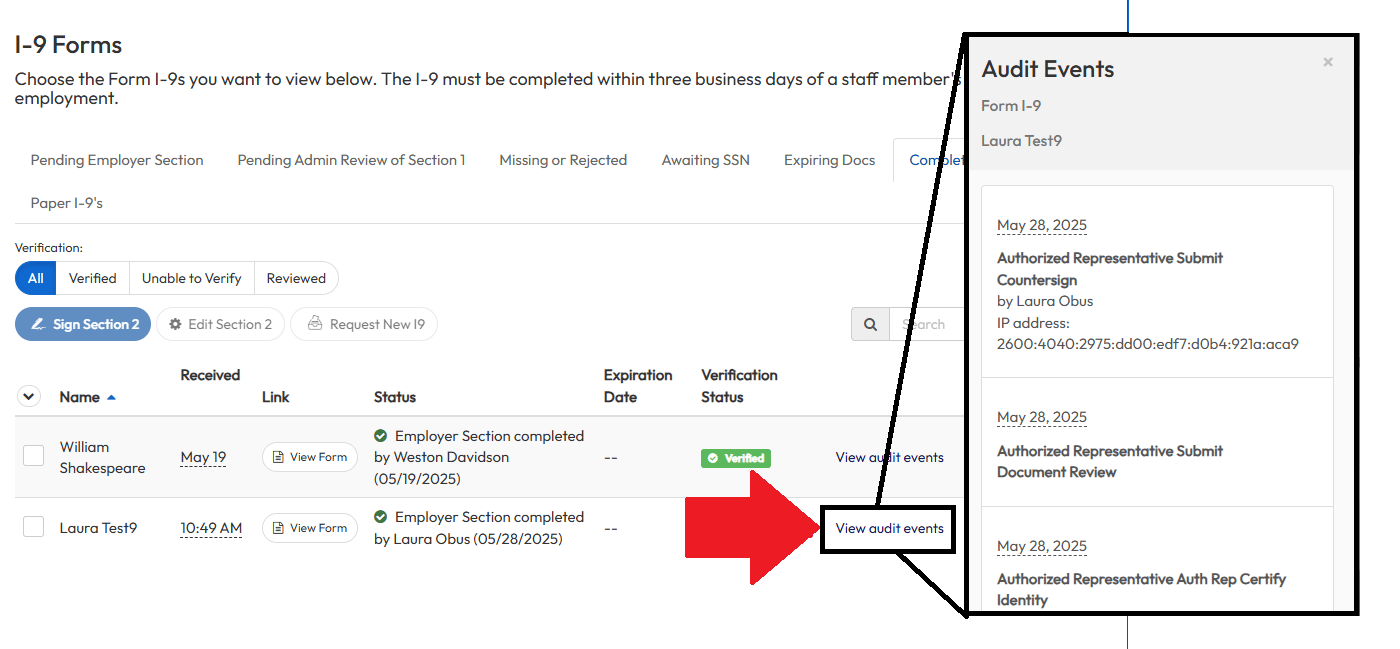
Administrators can access the audit trail by clicking into the "View audit events" on any of the I-9 status pages within the employer embedded mode. To get to an I-9 status page, click on the “Form I-9s” link under the Form I-9 Summary in the administrator homepage.
 #### E-Verify events
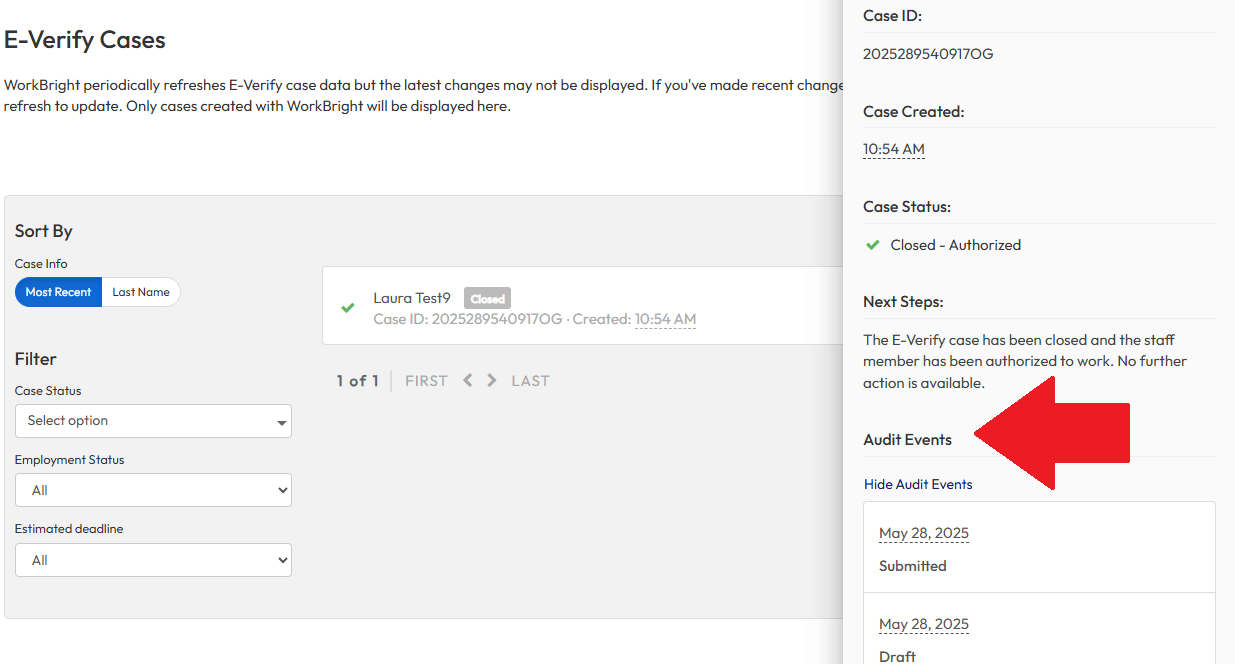
Administrators can access E-Verify event details from within E-Verify cases listing. To get to the E-Verify cases list, click on the “E-Verify cases” link under the E-Verify Summary in the administrator homepage.
#### E-Verify events
Administrators can access E-Verify event details from within E-Verify cases listing. To get to the E-Verify cases list, click on the “E-Verify cases” link under the E-Verify Summary in the administrator homepage.
 ### API
All audit details for a specific Form I-9 submission are returned in the `auditLogs` array from the `/employers/{employerId}/employees/{employeeId}/submissions/{submissionId}` endpoint, where each object represents one recorded action.
See [Audit Log Reference](/i9/compliance-and-audit-readiness/audit-logs) for the request, the fields returned on each entry, and the complete list of event names.
### API
All audit details for a specific Form I-9 submission are returned in the `auditLogs` array from the `/employers/{employerId}/employees/{employeeId}/submissions/{submissionId}` endpoint, where each object represents one recorded action.
See [Audit Log Reference](/i9/compliance-and-audit-readiness/audit-logs) for the request, the fields returned on each entry, and the complete list of event names.