> ## Documentation Index
> Fetch the complete documentation index at: https://docs.symmetry.com/llms.txt
> Use this file to discover all available pages before exploring further.
# Configure E-Verify
> Configure E-Verify for an employer after registering it and its administrator. Covers the request and response elements and the two-step implementation process.
Once you've registered your employer and administrator, the next step is to configure E-Verify for any employer that will be using the E-Verify program as part of the I-9 process.
E-Verify configuration can be set up in two ways:
1. **API Setup** – use the API to pass E-Verify credentials directly for an employer. This avoids requiring the administrator to key them in manually through Embedded Mode.
2. **Embedded Mode Setup** – generate a secure, embeddable link that allows an administrator to sign in and configure E-Verify credentials through the UI. This remains the method for ongoing credential updates.
## Option 1: Configure E-Verify using the API
Use the following endpoint to establish E-Verify credentials for an employer with an active E-Verify account:
POST `/v1/employers/{employerId}/everifySettings`
### Request
```json theme={null}
{
"companyId": "123456",
"programAdministratorId": "789012",
"programAdministratorFirstName": "John",
"programAdministratorLastName": "Doe",
"programAdministratorEmail": "john.doe@example.com",
"programAdministratorPhone": "234-567-8901",
"webServiceUsername": "everify_user",
"webServicePassword": "everify_pwd"
}
```
#### Request elements
| Element | Description |
| ------------------------------- | ---------------------------------------------------------------------------------------------------------------------- |
| `companyId` | The employer’s E-Verify company ID (from the E-Verify portal, company profile). |
| `programAdministratorId` | The E-Verify user profile ID (from the E-Verify portal, user profile). |
| `programAdministratorFirstName` | Program Administrator’s first name (from the E-Verify portal). |
| `programAdministratorLastName` | Program Administrator’s last name (from the E-Verify portal). |
| `programAdministratorEmail` | Program Administrator’s email (from the E-Verify portal). |
| `programAdministratorPhone` | Program Administrator’s phone number (from the E-Verify portal). |
| `webServiceUsername` | The E-Verify web service user ID (from the E-Verify portal, web service profile). *Note: this is an ID, not an email.* |
| `webServicePassword` | The E-Verify web service password (from the E-Verify portal, web service profile). |
##### E-Verify mapping
Below you'll find screenshots from the E-Verify portal where you can find the data needed for the request.
| | E-Verify Portal |
| :------------------------------------------------------- | :------------------------------------------------------------------------------------------------------------------------------------------------------------------------------------------------------------------------------------------------------------------------------------------------------------------------------------------------------------------------------------------------------------------------------------------------------------------------------------------------------------------------------------------------------------------------------------------------------------------------------------------------------------------------------------------------------------------------------------------------------------------------------------------------------------------------------------------------------------------------------------------------------------------------------------------------------------------------------------------------------------------------------------------------------------------------------------------------------------------------------------------------------------------------------------------------------------------------------------------------------------------------------------------------------------------------------------------------------------------------------------------------------------------------------------------------------------------------------------------------------------------------------------------ |
| Company ID | 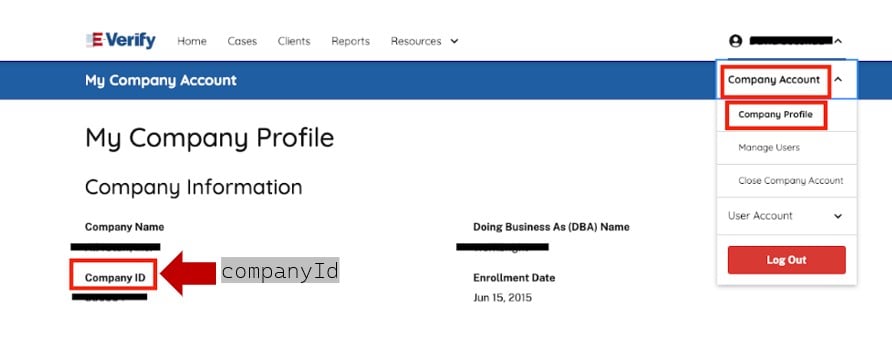 |
| User Credentials |
|
| User Credentials | 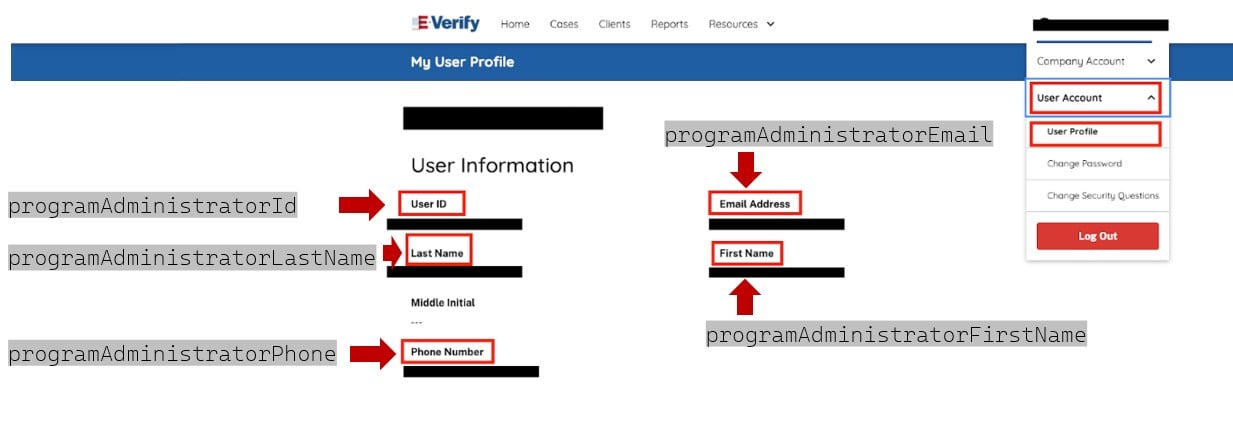 |
| Webservice Credentials: navigation to webservice user |
|
| Webservice Credentials: navigation to webservice user | 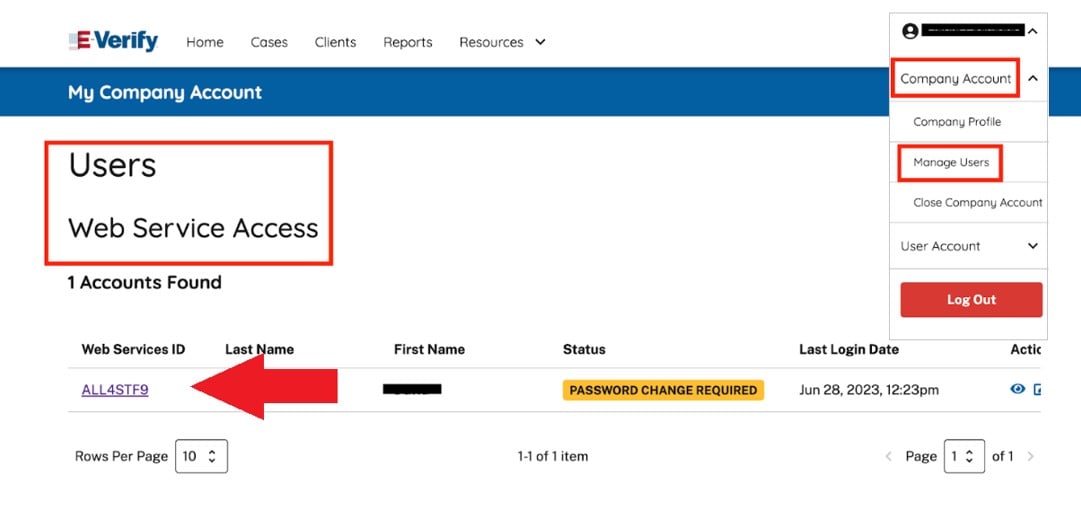 |
| Webservice Credentials: webservice username and password |
|
| Webservice Credentials: webservice username and password | 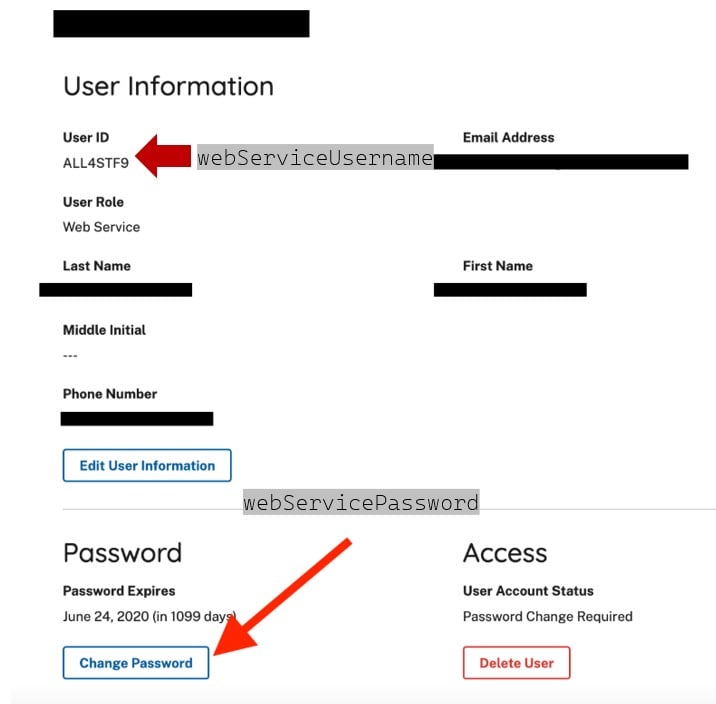 |
### Response
The API will return the saved E-Verify settings in the `everifySettings` object.
```json theme={null}
{
"everifySettings": {
"companyId": "123456",
"programAdministratorId": "789012",
"programAdministratorFirstName": "John",
"programAdministratorLastName": "Doe",
"programAdministratorEmail": "john.doe@example.com",
"programAdministratorPhone": "234-567-8901",
"webServiceUsername": "everify_user",
"webServicePassword": "everify123"
}
}
```
## Option 2: Configure E-Verify via embedded mode
The embedded E-Verify settings page lets a company administrator enter the employer's E-Verify credentials directly in your platform. It collects the same values as the API request above, so the administrator can complete setup without you handling credentials.
|
### Response
The API will return the saved E-Verify settings in the `everifySettings` object.
```json theme={null}
{
"everifySettings": {
"companyId": "123456",
"programAdministratorId": "789012",
"programAdministratorFirstName": "John",
"programAdministratorLastName": "Doe",
"programAdministratorEmail": "john.doe@example.com",
"programAdministratorPhone": "234-567-8901",
"webServiceUsername": "everify_user",
"webServicePassword": "everify123"
}
}
```
## Option 2: Configure E-Verify via embedded mode
The embedded E-Verify settings page lets a company administrator enter the employer's E-Verify credentials directly in your platform. It collects the same values as the API request above, so the administrator can complete setup without you handling credentials.
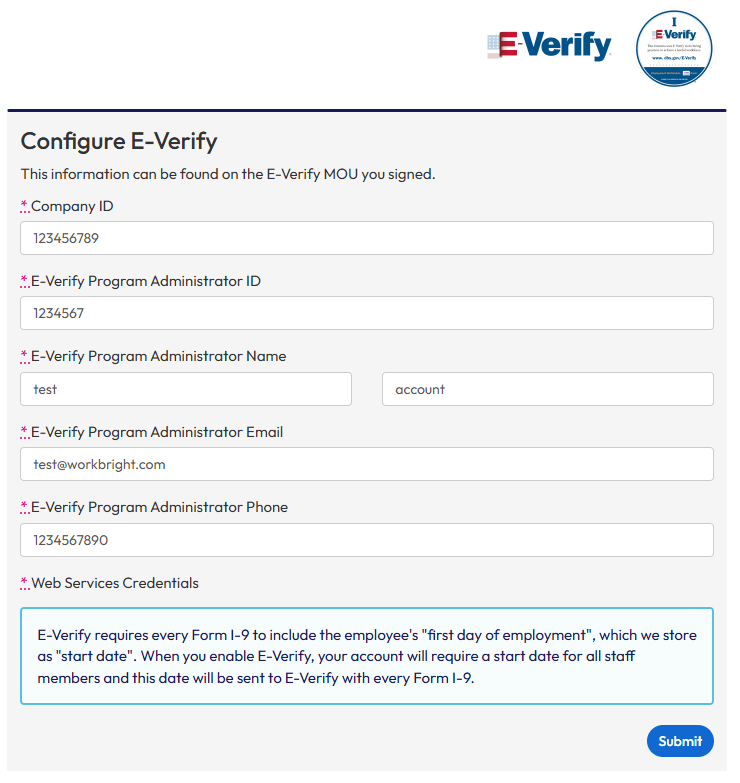 Implementing Embedded Mode configuration in your platform is a two-step process:
1. Authenticate the administrator using the `authenticateUri`
2. Navigate to the `embeddedUri` to complete the configuration
The administrator must be authenticated *before* accessing the E-Verify settings page. Both links are returned by the API and must be used in sequence to ensure a successful configuration.
**Enabling E-Verify makes start date mandatory.** E-Verify requires every Form I-9 to include the employee's first day of employment, which Symmetry stores as `startDate`. Once E-Verify is enabled, a `startDate` is required for every employee under that employer and is sent to E-Verify with each Form I-9. See [Configure Employees & Administrators](/i9/getting-started/configure-employees-and-administrators) for where that field is set.
## Generate E-Verify configuration page
The `/employers/{employerId}/admins/{adminId}/everifySettings/generateEverifySettingsUri` GET endpoint generates a secure, embeddable link to the E-Verify configuration for a valid administrator. Once embedded in your platform, the administrator can complete the form to enable automatic E-Verify case creation for all completed Forms I-9 under the employer.
### Request
```bash theme={null}
curl --location 'https://api.symmetry.com/i9/v1/employers/01971d41-b29d-75cf-a308-12345678/admins/01972152-29ab-78f4-93ce-12345678/everifySettings/generateEverifySettingsUri' \
--header 'Authorization: Bearer ••••••'
```
#### Path parameters
| Element | Type | Description |
| :----------- | :----- | :--------------------------------------------------------------------------- |
| `employerId` | string | The unique identifier of the employer for whom E-Verify is being configured. |
| `adminId` | string | The ID of the administrator completing the E-Verify configuration. |
### Response
A successful response returns a `token` object with two URLs: one for authentication and one for accessing the configuration page.
```json theme={null}
{
"token": {
"authenticateUri": "https://symmetry.workbright.com/sign_in_with_token?token=12345670a239f8b5809c",
"embeddedUri": "https://symmetry.workbright.com/admin/everify/accounts"
}
}
```
#### Two-step implementation process
To integrate the E-Verify settings page into your platform:
1. Authenticate the administrator using the `authenticateUri`: this one-time-use token link signs the user in securely
2. Embed or redirect to the `embeddedUri`: this opens the E-Verify settings form for configuration
* The administrator must be signed in using the `authenticateUri` **before** accessing the `embeddedUri`, or the page will not load properly.
#### Response elements
Below are the fields returned in the `token` object.
| Element | Type | Description |
| :---------------- | :----- | :------------------------------------------------------------------------------------------------------------------------------------------------------------------------------------------------------------------------------------------------------- |
| `authenticateUri` | string | A secure, one-time-use link that signs the administrator in directly using a token |
| `embeddedUri` | string | A direct link to the E-Verify configuration page where the authenticated administrator can complete or manage E-Verify setup for the employer. The administrator must be authenticated using the `authenticateUri` prior to accessing the `embeddedUri`. |
**Monitor E-Verify Credential Authentication**
Subscribe to the `employer.everifyAuthenticationResult` webhook event to receive updates on E-Verify credential authentication. Authentication occurs when credentials are added or updated and continues to run daily, so this event may be sent regularly.
Implementing Embedded Mode configuration in your platform is a two-step process:
1. Authenticate the administrator using the `authenticateUri`
2. Navigate to the `embeddedUri` to complete the configuration
The administrator must be authenticated *before* accessing the E-Verify settings page. Both links are returned by the API and must be used in sequence to ensure a successful configuration.
**Enabling E-Verify makes start date mandatory.** E-Verify requires every Form I-9 to include the employee's first day of employment, which Symmetry stores as `startDate`. Once E-Verify is enabled, a `startDate` is required for every employee under that employer and is sent to E-Verify with each Form I-9. See [Configure Employees & Administrators](/i9/getting-started/configure-employees-and-administrators) for where that field is set.
## Generate E-Verify configuration page
The `/employers/{employerId}/admins/{adminId}/everifySettings/generateEverifySettingsUri` GET endpoint generates a secure, embeddable link to the E-Verify configuration for a valid administrator. Once embedded in your platform, the administrator can complete the form to enable automatic E-Verify case creation for all completed Forms I-9 under the employer.
### Request
```bash theme={null}
curl --location 'https://api.symmetry.com/i9/v1/employers/01971d41-b29d-75cf-a308-12345678/admins/01972152-29ab-78f4-93ce-12345678/everifySettings/generateEverifySettingsUri' \
--header 'Authorization: Bearer ••••••'
```
#### Path parameters
| Element | Type | Description |
| :----------- | :----- | :--------------------------------------------------------------------------- |
| `employerId` | string | The unique identifier of the employer for whom E-Verify is being configured. |
| `adminId` | string | The ID of the administrator completing the E-Verify configuration. |
### Response
A successful response returns a `token` object with two URLs: one for authentication and one for accessing the configuration page.
```json theme={null}
{
"token": {
"authenticateUri": "https://symmetry.workbright.com/sign_in_with_token?token=12345670a239f8b5809c",
"embeddedUri": "https://symmetry.workbright.com/admin/everify/accounts"
}
}
```
#### Two-step implementation process
To integrate the E-Verify settings page into your platform:
1. Authenticate the administrator using the `authenticateUri`: this one-time-use token link signs the user in securely
2. Embed or redirect to the `embeddedUri`: this opens the E-Verify settings form for configuration
* The administrator must be signed in using the `authenticateUri` **before** accessing the `embeddedUri`, or the page will not load properly.
#### Response elements
Below are the fields returned in the `token` object.
| Element | Type | Description |
| :---------------- | :----- | :------------------------------------------------------------------------------------------------------------------------------------------------------------------------------------------------------------------------------------------------------- |
| `authenticateUri` | string | A secure, one-time-use link that signs the administrator in directly using a token |
| `embeddedUri` | string | A direct link to the E-Verify configuration page where the authenticated administrator can complete or manage E-Verify setup for the employer. The administrator must be authenticated using the `authenticateUri` prior to accessing the `embeddedUri`. |
**Monitor E-Verify Credential Authentication**
Subscribe to the `employer.everifyAuthenticationResult` webhook event to receive updates on E-Verify credential authentication. Authentication occurs when credentials are added or updated and continues to run daily, so this event may be sent regularly.