> ## Documentation Index
> Fetch the complete documentation index at: https://docs.symmetry.com/llms.txt
> Use this file to discover all available pages before exploring further.
# Global settings
> Org-wide Portal settings that change which taxes are returned. Covers payer, authority, tax withholding, address suggestions, and splitting PA EITs and LSTs.
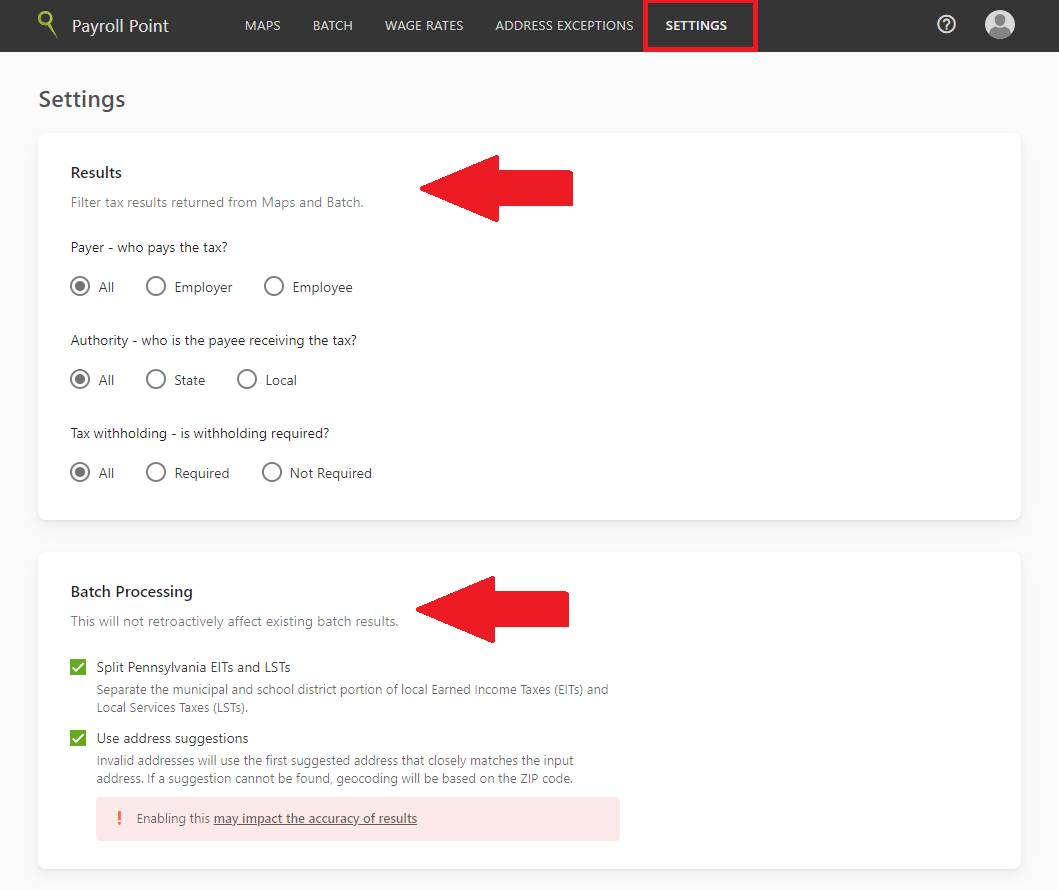
Payroll Point Portal has several global settings that customize the result output from Portal. They apply to Maps and Batch alike. The Settings tab has **Results** and **Batch Processing** sections.
1. Navigate to the **Settings** tab.
2. Adjust the Results and Batch Processing settings and click **Save changes**.
Global settings affect every user in your organization, not just you. Review them before running any lookups, since they change which taxes are returned rather than only how results are displayed.
| Setting type | Setting | Description |
| ---------------- | --------------------------------------------------- | ---------------------------------------------------------------------------------------------------------------------------------------------------------------------------------------------------------------------------------------------------------------------------------------------------------------------------------------------------- |
| Results | **Payer** (who pays the tax?) | Set the default filter value in Maps and Batch to `all`, `employer`, or `employee`. |
| Results | **Authority** (who is the payee receiving the tax?) | Set the default filter value in Maps and Batch to `all`, `state`, or `local`. |
| Results | **Tax withholding** (is withholding required?) | Determines whether taxes that have courtesy withholding are displayed in Maps and Batch results. When set to `all`, all potentially applicable taxes are displayed. When set to `required`, only taxes that employers are required to withhold are returned. When set to `not required`, only taxes applicable to courtesy withholding are returned. |
| Batch Processing | **Use address suggestions** | When enabled, if an invalid address is provided, Payroll Point uses the first suggested address that closely matches the input address instead of returning an error. If no suggested address is found, Payroll Point geocodes based on the ZIP code. See [Use address suggestions in batch](/prp/portal/address-suggestions). |
| Batch Processing | **Split Pennsylvania EITs and LSTs** | Separates the municipal and school district portions of Pennsylvania Earned Income Taxes (EITs) and Local Services Taxes (LSTs) for Maps and Batch lookups. |