> ## Documentation Index
> Fetch the complete documentation index at: https://docs.symmetry.com/llms.txt
> Use this file to discover all available pages before exploring further.
# Form completion example in the SPF API
> Walk through the forms, formQuestionSet, and fillPdf endpoints used to complete withholding forms in a Choose Mode implementation.
## Form Selection
Payroll form determination requires an employee's home location and one or more work locations. Once the home and work locations are passed into SPF and you've selected the "Choose Mode" implementation, the employee will be presented with a list of all possible withholding forms to choose from. When a user knows what form(s) they need to complete, providing them with a listing of relevant forms may be the optimal approach. The alternate approach is to use the "Guided Mode" process which asks the user targeted questions to help determine the appropriate form(s). See the [Guided Flows Example](/spf/api-reference/forms/return-applicable-guided-flows-for-given-home-and-work-addresses) for more details.
## Example
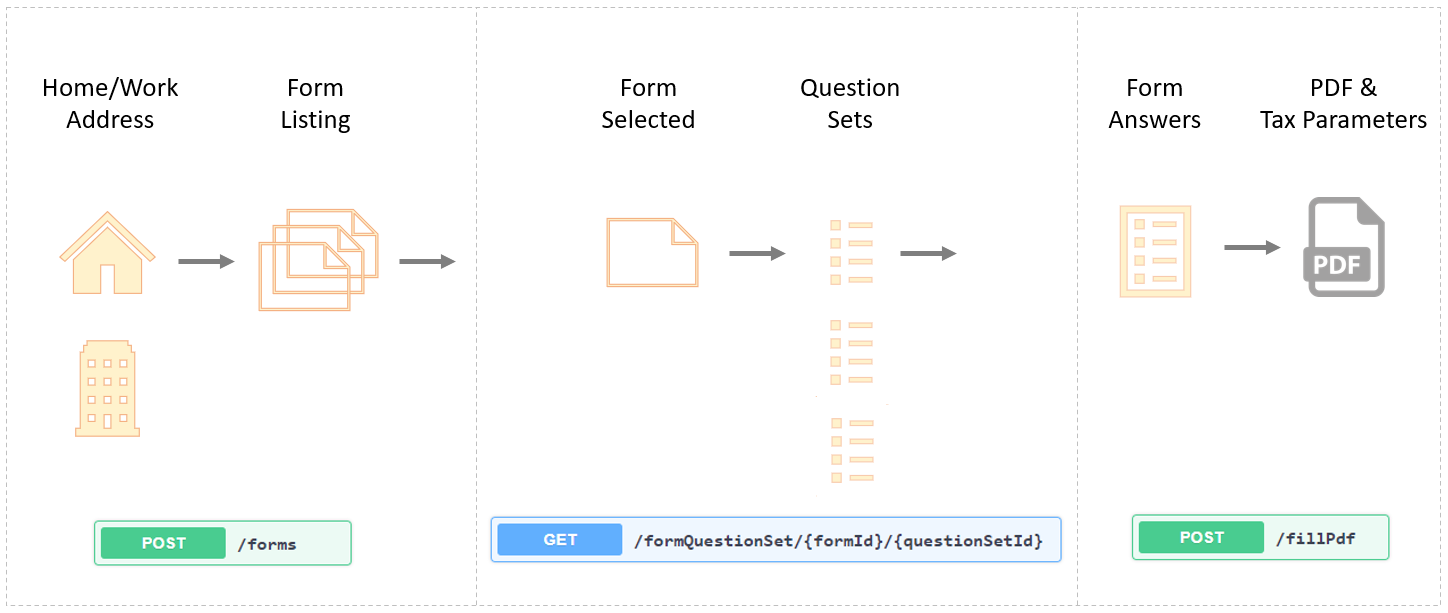
Below is a high-level example of the endpoints that can be used to complete the forms necessary for an employee's payroll withholding elections. Please refer to the individual endpoint documentation for specific implementation details.
1. Provide address information to the [forms](/spf/api-reference/forms/return-applicable-forms-for-given-home-and-work-addresses) POST endpoint (this step can be omitted if the withholding forms have already been determined or if provided by the [Guided process](/spf/api-reference/forms/return-applicable-guided-flows-for-given-home-and-work-addresses).
2. An unfiltered Forms listing is provided when the /forms endpoint is used.
3. Using a provided `formID`, use the [formQuestionSet](/spf/api-reference/questions/retrieve-question-set-for-a-form-by-id) endpoint and specify the first question set for the form: `/formQuestionSet/W4101/QS1`.
4. Iterate over the `formQuestionSet` while ensuring to capture the answers to each question. The SPF API response will also provide the next relevant question set to present to the user based on their answers to the current question set. The final question set can be identified when `hasMoreQuestions` equals false. See the [formQuestionSet](/spf/api-reference/questions/retrieve-question-set-for-a-form-by-id) endpoint for more detailed implementation instructions.
5. To generate the final PDF, use the [fillPdf POST](/spf/api-reference/pdf-and-tax-parameters/retrieve-completed-form-pdf-and-tax-parameters) endpoint and provide the field values collected to receive a base64 encoded PDF and the applicable tax parameters. The [fillPdf GET](/spf/api-reference/pdf-and-tax-parameters/return-form-data-for-example-required-fields-and-tax-parameter-schema) endpoint can be used to view all the relevant form fields that may be necessary to complete a PDF version of the form.
The image below provides a graphical representation of the form completion process and includes the SPF API endpoints necessary to complete the relevant withholding forms.