


Our Client Support team helps you run a successful payroll experience with Symmetry.
Hours of operation: 8:00am to 5:00pm, Monday through Friday, Arizona local time (Arizona does not observe Daylight Saving Time). See Holiday closures.
Severity levels and target response times
Set the severity when you submit a ticket. The table below defines each level, with examples, and the initial response time we target for it. The time frames listed in the table below refer to the Symmetry hours of operation identified above.Holiday closures
Symmetry is closed on the following holidays: New Year’s Day, Martin Luther King Jr. Day, President’s Day, Memorial Day, Juneteenth, Independence Day, Labor Day, Veterans Day, Thanksgiving Day, the Day After Thanksgiving, Christmas Eve, and Christmas Day. A holiday that falls on a Saturday is observed on the preceding Friday, and one that falls on a Sunday is observed on the following Monday.Contact Support
Go to support.symmetry.com and select + Create ticket. You must log in to access the Client Support Center. For help with access, see User Management Frequently Asked Questions.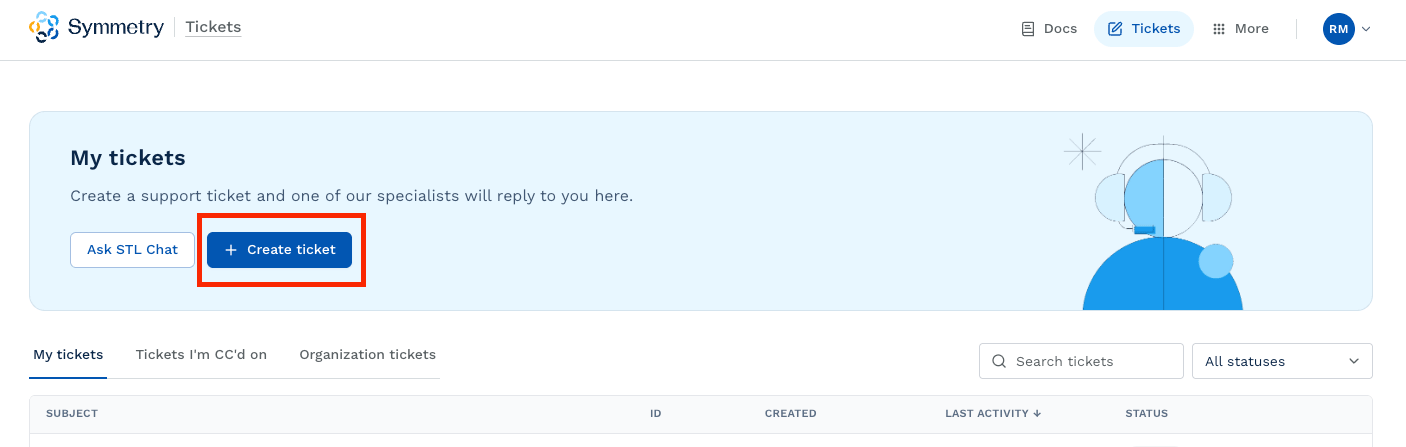
Major incidents
A major incident is an emergency-level loss of service or disruption that affects a large percentage of users. Submit an Urgent ticket via the Client Support Center during business hours. For after-hours support, call +1-480-596-1500 and press 1 to reach our after-hours phone service. State that you are experiencing a major incident, and the on-call support analyst will follow up with you promptly.Defects and other reportable issues
If you suspect a service disruption, first check the real-time Symmetry Status Page, where you can also subscribe to email notifications of downtime and restored service. If it shows no known issues, submit a ticket and set the severity to Urgent. When you submit a ticket for a suspected defect, include as many details as possible:- The product, release version, and expected behavior.
- An explanation of the issue and the exact steps to replicate it, with screenshots.
- Any troubleshooting you have already performed.
- The severity level (see Severity levels and target response times).
Details to provide by product
Select your product to see what to include in your ticket.Symmetry Tax Engine (STE)
Symmetry Tax Engine (STE)
- For all calculation issues, provide a detailed calculation of the results expected from the STE, the withholding guide you referenced for the calculation, and the relevant Unique Tax ID.
- Identify which endpoint you are calling and attach the JSON or XML contents of your request and response.
- For all calculation issues, provide a detailed calculation of the results expected from the STE, the withholding guide you referenced for the calculation, and the relevant Unique Tax ID.
- Specify which programming language interface your installation is using and provide a log file from the transaction set to “DEBUG” level logging. If the issue is installation related, specify your operating system.
- Provide any IDE or console errors that were returned when executing your application.
Symmetry Tax Logic (STL)
Symmetry Tax Logic (STL)
- Attach the JSON contents of your request and your response to the
/explainendpoint. - Provide details of the payroll context (PayCalc session recording or compressed
payCalc).
- Identify the web browser and browser version you are using, and any errors received from the browser or the application itself.
- If the issue pertains to the calculation explanations, provide a payload or log file.
- Provide the prompt, error message, and response.
Symmetry Guides
Symmetry Guides
- Identify the web browser and browser version you are using, and any errors received from the browser or the application itself.
- Provide steps to duplicate your issue.
- If the issue is for an AI search issue, provide the prompt, error message, and response.
Symmetry Payroll Forms (SPF)
Symmetry Payroll Forms (SPF)
- Identify which endpoint or URL you are calling.
- Attach the JSON contents of your request and your response.
- Identify the web browser and browser version you are using, and any errors received from the browser or the application itself.
- Provide the Registration Context JSON (the JSON submitted to SPF), the URL and profile hash you are using to access SPF, and whether your issue is with staging or production.
- If the issue pertains to the forms returned or questions process, provide a copy of the complete JSON output stream, including log data.
- Identify the web browser and browser version you are using, and any errors received from the browser or the application itself.
- Provide the Registration Context JSON (the JSON submitted to SPF), a log file from the transaction set to “TRACE” level logging, and a copy of your
settings.jsonfile. - If the issue pertains to the forms returned or questions process, provide a copy of the complete JSON output stream, including log data.
Symmetry I-9
Symmetry I-9
- Provide the employer ID, employee ID, and employee email. Provide a screenshot or screen recording of the issue.
- Identify the web browser and version.
- If the issue pertains to E-Verify, provide the E-Verify case number and the error you are receiving.
- Identify which endpoint or URL you are calling.
- Attach the JSON contents of your request and your response.
Symmetry Payroll Point (PRP)
Symmetry Payroll Point (PRP)
- Identify which endpoint or URL you are calling.
- Attach the JSON contents of your request and your response.
- If multiple addresses are contained within the request, specify the address causing the issue.
- For Maps, specify the resident and work address used, and provide screenshots of the expanded Work Location and Home Location sections and of the section returning unexpected results.
- For Batch, identify the batch name and line number(s) causing your issue, and include the CSV batch file if you imported one.
Symmetry Minimum Wage Finder (MWF)
Symmetry Minimum Wage Finder (MWF)
- Identify which endpoint or URL you are calling.
- Attach the JSON contents of your request and your response.
- For Maps, specify the work address used, and provide screenshots of the expanded Work Location section and of the section returning unexpected results.
- For Batch, identify the batch name and line number(s) causing your issue, and include the CSV batch file if you imported one.
Calculators by Symmetry (CBS)
Calculators by Symmetry (CBS)
- Attach the JSON contents of your request and your response.
- Provide the page HTML that references the widget.
- Provide a screenshot of the initial calculation page with all relevant values entered, and a screenshot of the calculation results page.
Symmetry product release schedule
Symmetry provides regularly scheduled product releases to capture tax updates and changes throughout the year designed to support compliance.How often does Symmetry update each product?
How often does Symmetry update each product?
What warrants an interim product release?
What warrants an interim product release?
What is Symmetry's standard product release schedule?
What is Symmetry's standard product release schedule?
Staging maintenance
We use rolling updates to keep staging environments available during maintenance. Expect brief intermittent connectivity every Monday between 8:30am and 9:00am MST, and avoid critical testing during that window. This affects staging for Symmetry Tax Engine, Symmetry Payroll Forms, Symmetry Payroll Point, Symmetry Minimum Wage Finder, and Calculators by Symmetry. We may also upgrade staging at other times.Additional support resources
This section provides additional details related to product release schedules, tax compliance updates and changes, and new features and product enhancement requests.How does Symmetry stay current with the latest tax and form changes in order to remain in compliance?
How does Symmetry stay current with the latest tax and form changes in order to remain in compliance?
Can we request new features and product enhancements?
Can we request new features and product enhancements?
What is the process to submit a new feature or enhancement request?
What is the process to submit a new feature or enhancement request?
What is the timeline for seeing my new feature or enhancement request get implemented should Symmetry decide to move forward?
What is the timeline for seeing my new feature or enhancement request get implemented should Symmetry decide to move forward?
What if there is a feature not currently supported but needed for our implementation?
What if there is a feature not currently supported but needed for our implementation?