

Before you begin
You’ll need an authorization token to log in to Portal. If you don’t have one, contact your Symmetry Client Success representative or reach out through the Client Support Center. See Prerequisites for the account configuration your administrator needs to complete, and the global settings that change which taxes are returned.Step 1: Log in
Navigate to Portal and enter your authorization token on the landing page.- Production: https://payrollpoint.symmetry.com
- Staging: https://payrollpoint-staging.symmetry.com
 Before your first lookup, review Global settings, which change which taxes are returned for everyone in your organization. You can also adjust Maps display settings for how boundaries and map views are drawn.
Step 2: Run your first maps lookup
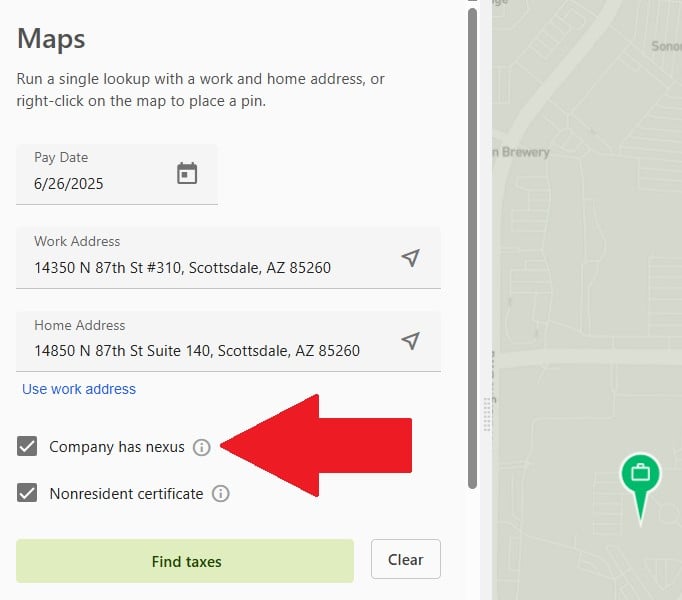
Maps returns taxes for a single employee’s home and work address pair.- Navigate to the Maps tab.
- Enter the employee’s home address and work address in their respective fields (for example,
14350 N 87th St, Scottsdale, AZ 85260). Use commas to separate street, city, and state within each address field. - Specify whether the employer has Company has nexus in the home state, and whether the employee has a Nonresident certificate on file for the work state, then click Find taxes. After the first lookup, the button label changes to Search again.
- Review the results panel for the required and additional employer and employee taxes returned for each location.
Step 3: Run your first batch (optional)
Batch returns taxes for multiple home and work address pairs at once, either from a CSV upload or entered manually.- Navigate to the Batch tab and click Import batch to upload a CSV of employee data, or manually enter batch lines one-by-one.
- Run the batch to process every home and work address pair in it.
- Once the batch completes, download the results using a custom download template or the standard minimum wage rate export.
Next steps
Tax results
How to read what a lookup returns, and what each tax in the response means.
Data and accuracy
How addresses are geocoded, and why an imprecise location changes the taxes returned.